
Blocking Contacts
In certain situations, it may be necessary to block contacts within the Carrick Health platform. This document outlines the straightforward process for both blocking and unblocking contacts to ensure a seamless user experience.
Blocking a Contact
To block a contact in Carrick Health, follow these simple steps:
Navigate to the Contacts page.
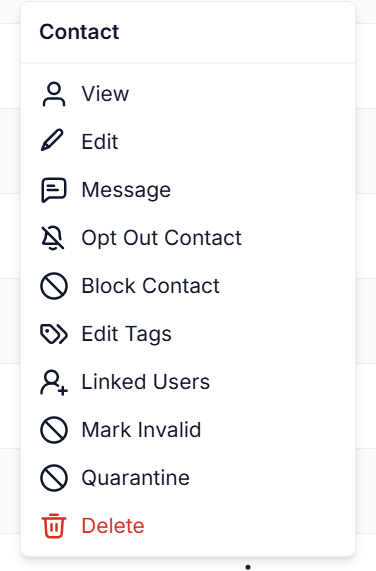
Locate the contact you wish to block and click on the stacked dots icon located on the right side of the contact's name.
Select Block Contact from the dropdown menu.
You will be prompted to confirm your decision to block the contact. Confirm to proceed.
Unblocking a Contact
If you need to unblock a contact, the process is equally simple. Just repeat the steps outlined above:
Go to the Contacts page.
Find the blocked contact and click on the stacked dots icon next to their name.
Select Unblock Contact from the dropdown menu.
By following these steps, you can easily manage your contacts within the Carrick Health platform, ensuring that your communication preferences are respected.